How To Install Android 4.4.2 KitKat On T-Mobile Samsung Galaxy S3 Using HellKat Custom ROM [Tutorial]


galaxyS2
Here is how to flash HellKat custom ROM on the T-Mobile variant of the Galaxy S3 to update the device to Android 4.4.2 KitKat. Samsung
The T-Mobile (NYSE:TMUS) version of the Samsung (KRX:005935) Galaxy S3 with the model number SGH-T999 can be updated to the latest Android 4.4.2 KitKat using HellKat ROM, a custom firmware based on CyanogenMod 11 sources.
The HellKat custom ROM is not an official release by Samsung, but just a custom ROM that would require a custom recovery like ClockworkMod to flash the ROM zip and Google Apps zip files on the Galaxy S3.
Users need to have proper backup for their personal data on the phone as they will have to wipe all the previous data and apps off before flashing the custom ROM. In addition, the handset should have at least 80 percent of battery power, and the computer to be used in the installation process must have the USB drivers for the Galaxy S4 installed. The users also need to ensure that USB Debugging is enabled on the phone.
During the installation, if the device gets stuck on booting, users can perform wipe cache partition and wipe dalvik before rebooting the phone. Here is the tutorial to install Android 4.4.2 KitKat on T-Mobile Samsung Galaxy S3 using HellKat custom ROM:
Note: International Business Times cannot be held responsible if anything goes wrong. Users should proceed at their own risk.
Step 1: Download HellKat Android 4.4.2 ROM and Google Apps for Galaxy S3 to your computer.
Step 2: Connect the Galaxy S3 to PC via USB and copy the HellKat ROM and Google Apps packages to the root folder of your handset’s SD card without extracting them.
Step 3: Disconnect USB and turn off your phone.
Step 4: Get into the Recovery Mode. To do this switch on the phone while pressing and holding Volume Up, Home and Power buttons together.
Step 5: In the Recovery Mode, perform a factory reset by selecting “wipe data/factory reset.” Use the Power button to select options. Now, perform a cache wipe by selecting “wipe cache partition.”
Step 6: Now wipe the dalvik cache as well. From CWM recovery, go to “Advanced Menu” and then select “wipe dalvik cache.”
Step 7: Go back to the main recovery screen and select “install zip from sdcard” and then select “choose zip from sdcard.”
Step 8: Use the Volume keys to go to the Android 4.4.2 ROM zip file copied to the SD card and select it using the Power button.
Step 9: Repeat Step 7 and Step 8 to install Google Apps.
Step 10: Once the installation is complete, press the “+++Go back+++” button to go back to the main recovery menu and select “reboot system now.”
The phone will now reboot, a process that will take about five minutes. Do not press any button during this period.
[Source: Team Android]

Samsung Galaxy Note 10.1 2014 Edition review

Samsung has a bewildering array of tablets and smartphones out at the moment, but there's nothing confusing about where the Galaxy Note 10.1 2014 Edition sits. It's the Korean firm's top-of-the-range consumer tablet, and it's designed to rival such products as the Nexus 10, Amazon Kindle Fire HDX 8.9in, Sony Xperia Tablet Z and Apple iPad Air.
It certainly has the price and specification to match those aspirations. It costs £399 inc VAT, boasts a 10.1in high-DPI 2,560 x 1,600 resolution screen, a 1.9GHz Samsung Exynos octa-core processor, an 8-megapixel camera and – as with all the Note products – a pressure-sensitive stylus, which slots neatly into the top-right corner of the tablet.
Other notable features include an infrared transmitter that turns the tablet into a universal remote control for your TV and set-top box, and 802.11ac Wi-Fi. Surprisingly, there's only 16GB of built-in storage, but there is a microSDXC slot for adding more.
Samsung Galaxy Note 10.1 2014 Edition
The design is reasonably high-end, too, with a seamless strip of chrome-effect plastic surrounding the edge and a white plastic rear, imprinted with a leather-effect pattern. If this sounds cheesy, it doesn't come across so in the flesh. The Note 10.1 doesn't wow like the iPad Air or the Xperia Tablet Z, and isn't particularly light at 535g. However, there isn't anything cheap about its design. It's certainly a big improvement on the first Note 10.1, which was bulkier and heavier.
Fire it up, and the good impressions continue. The screen – as is typical of Samsung's flagship devices – boasts a bright and fully saturated look, and with a pixel density of 299ppi, it matches the Nexus 10 and outdoes the iPad Air. It's a magnificently crisp display.
Resolution isn't everything, however, and on the quality front, the Note 10.1 also scores highly. Measured with our colorimeter, the display hit a maximum brightness of 367cd/m2 and a contrast level of 798:1. It isn't as bright or quite as colour-accurate as the iPad Air – it crushes greys into blacks a touch more, and whites are a shade yellow – but again we're splitting hairs here, and fine ones at that.

Performance, battery life and camera

With an eight-core SoC inside, it looks well up to the job of keeping Android 4.3 running smoothly, too. In fact, the Note's Samsung Exynos 5 Octa comprises a pair of quad-core processors: one clocked at 1.9GHz for demanding tasks such as games, and the other clocked at 1.3GHz, which kicks in when such high power isn't required – watching video, for instance, or listening to music. In addition, there's a sizeable 3GB of RAM, and a six-core Mali-T628 GPU for gaming.
Samsung Galaxy Note 10.1 2014 Edition 
In benchmark testing, we found it to be quick, but not quite as rapid as the iPad Air. In the GFXBench T-Rex HD test run at native resolution, for instance, the Note 10.1 gained an average of 14fps; the Air scored 21fps. Its SunSpider result is a touch more impressive at 612ms, but again it lags behind the iPad Air's 391ms. In Geekbench 3, its scores were excellent, with 931 and 2,602 in the single- and multi-core tests, but behind the Apple tablet once more.
Things begin to look up when you begin to compare it with its Android rivals. Overall, the Note 10.1 2014 Edition is on a par with the superb Kindle Fire HDX 8.9in, and faster than the Nexus 10 and Xperia Tablet Z. It's as fast an Android tablet as you can buy right now, and lacks for nothing when it comes to responsiveness and overall feel. There's no discernible typing lag when entering text with the onscreen keyboard, and menus and homescreen animations are generally stutter-free.

Specs

  • Device type:
    • Tablet
  • Phone functionality:
    • Yes
  • OS:
    • PopupAndroid (4.3) TouchWiz UI
  • Dimensions:
    • 9.57 x 6.75 x 0.31 inches (243.1 x 171.4 x 7.9 mm)
  • Weight:
    • 19.29 oz (547 g)
      the average is 15.8 oz (451 g)

DisplayPopupbenchmark

  • Physical size:
    • 10.1 inches
  • Resolution:
    • 2560 x 1600 pixels
  • Pixel density:
    • 299 ppi
  • Technology:
    • Super Clear LCD
  • Colors:
    • 16 777 216
  • Touchscreen:
      • Multi-touch
  • Features:
    • Light sensor

Camera

  • Camera:
      • Popup8 megapixels
    • Flash:
      • LED
    • Features:
      • PopupBack-illuminated sensor (BSI), Auto focus, Face detection, Smile detection, Exposure compensation, ISO control, White balance presets, Burst mode, Digital zoom, Geo tagging, Panorama, Scenes, Self-timer
  • Camcorder:
      • 1920x1080 (1080p HD)
  • Front-facing camera:
      • 2 megapixels

Hardwarebenchmark

  • System chip:
    • Qualcomm Snapdragon 800 MSM8974
  • Processor:
    • Quad core, 2300 MHz, Krait 400
  • Graphics processor:
      • Adreno 330
  • System memory:
    • 3072 MB RAM
  • Built-in storage:
    • 16 GB
  • Storage expansion:
    • microSD, microSDHC, microSDXC up to 64 GB

Battery

  • Talk time (3G):
    • 43.00 hours
      the average is 36 h (2140 min)
  • Capacity:
    • 8220 mAh
  • Not user replaceable:
    • Yes

MultimediaPopupbenchmark

  • Music player:
    • Filter by:
      • Album, Artist, Playlists
    • Features:
      • Album art cover, Background playback
  • Speakers:
    • Stereo speakers
  • YouTube player:
    • Yes

Internet browsing

  • Built-in online services support:
    • Facebook, YouTube (upload), Picasa/Google+, Twitter

Technology

  • GSM:
    • 850, 900, 1800, 1900 MHz
  • UMTS:
    • 850, 900, 1900, 2100 MHz
  • FDD LTE:
    • 800 (band 18), 850 (band 5), 900 (band 8), 1800 (band 3), 2100 (band 1), 2600 (band 7) MHz
  • Data:
    • LTE Cat4 Downlink 150 Mbit/s, LTE Cat3/4 Uplink 50 Mbit/s, HSDPA+ (4G) 42.2 Mbit/s, HSUPA 5.76 Mbit/s, UMTS, EDGE, GPRS, EV-DO Rev.A
  • Micro SIM:
    • Yes
  • Positioning:
    • GPS, A-GPS, Glonass
  • Navigation:
    • Turn-by-turn navigation

Samsung Galaxy S5 review

Samsung Galaxy S5 preview

Samsung Galaxy S5
With Samsung officially unveiling the Galaxy S5 at Mobile World Congress, we finally have confirmation of the Korean company’s next flagship smartphone.
Read on for all the details.

It’s a powerhouse

Samsung isn’t shy when it comes to loading its top-of-the-range phones with headline-grabbing specs, and the Galaxy S5 is no different. Centre stage is its quad-core Snapdragon 805 processor, which runs at a blistering 2.5GHz. This chip, paired with 2GB of RAM, means the phone shouldn’t have any bother smoothly running any app you throw at it. One thing to note: it isn’t 64-bit – that’s probably going to be a feature of next year’s Samsung flagship.
The phone comes with Android 4.4 KitKat and a new version of Samsung’s TouchWiz interface. There’s no word yet on whether or not a stock Android Google Play or Nexus edition will be be available.
Meanwhile, a 2800mAh battery should give the S5 enough juice to easily last a day (Samsung claims 21 hours of talk time), and as with previous Galaxy S phones it’s swappable.
You also get a choice between 16GB and 32GB of expandable storage (you can add up to 64GB extra via microSD), and there’s a microUSB 3.0 port for quick transfer speeds.
On the connectivity front, there’s both 4G LTE (supporting the speedy Category 4) and fifth generation Wi-Fi 802.11ac and 2X2 MiMo, plus a feature called Download Booster which uses both Wi-Fi and 4G simultaneously to download files more speedily.

Dimpled and waterproof

Samsung Galaxy S5The rumours claiming the S5 would boast a metal body have turned out to be hot air – Samsung has stuck with a mostly-polycarbonate build. That said, from our hands-on time we can say it’s the best build quality a Galaxy S phone has offered thus far. The dimpled, matte soft-touch back is much nicer to look at and hold than the faux-leather hard plastic of recent Galaxy Note phones and tablets, and the overall feeling is one of solidity and quality.
One major improvement over the S4 is IP67 waterproofing, bringing the S5 into line with Sony’s Xperia phones. It’s sealed to prevent any water or dust getting inside, so you can dunk the handset into water for as long as 30 minutes and it won’t protest one bit.
Oh, and we have the vital statistics too: it weighs 145g and measures up at 142 x 72.5 x 8.1mm.
It’ll be available in several colours, including Charcoal Black, Shimmery White, Electric Blue and Copper Gold.

Screen: bigger, but no QHD

Screen: bigger, but no QHDIn retrospect, speculation about the S5 toting a quad HD 2560 x 1440 screen always seemed a touch far-fetched, so we’re not particularly surprised to see that Samsung has retained a full HD 1080p resolution instead. The AMOLED screen, however, is slightly larger than the S4’s at 5.1in.

Fingertips of fun

Samsung has fitted the S5 with a fingerprint scanner, which serves three main purposes. First, it can swiftly unlock the phone, which works much like the Touch ID sensor on Apple's iPhone 5s (albeit a little less snappy – but it’s much more accurate than the HTC One Max’s scanner).
The second function is instant online mobile payments via PayPal integration, and the third is to protect important documents with a Private Mode that's unlocked by your fingerprint.
Round the back, there's a heartrate sensor – the first ever seen on a smartphone, designed to play nice with Samsung's revised S Health app.

Supercharged autofocus

The Galaxy S5's 16MP camera comes with an LED flash, a new advanced HDR mode and post-shot focusing: it takes two images every time you press the shutter, with the focus trained in different spots: one on the subject and one on the background. This means that, after the shot’s been taken, you can choose a defocussed or sharply focussed background (mostly for aesthetic reasons). But probably the camera’s best new feature is its super-fast autofocus, which Samsung claims is the fastest on any smartphone at up to 0.3 seconds.
Round the front, there's a 2.1MP front camera for video chatting and selfies.

Price and availability

Samsung Galaxy S5Samsung has kept quiet on the price thus far, but we should find out some time ahead of the Galaxy S5’s 11th April launch. We'll keep you updated.
Vodafone, Three, EE, Phones4u and Carphone Warehouse have all announced that they will be stocking the Galaxy S5, though prices and tariffs have yet to be revealed. We'll be updating this page with more details and links as they come in.

PC Suite for your Android phone

Hi Guys
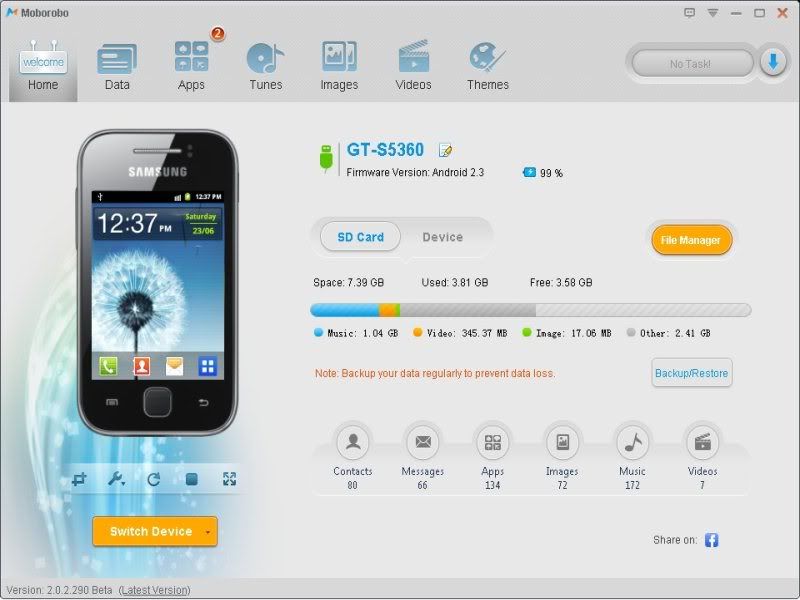
I am here, to present you a cool software that will work just like PC suite for your android phone. Actually, I am a Samsung Galaxy Y GT-5360 user. So I tried this software personally, & just loved it !
One of the unique feature, I observed in this software is realtime preview of your phone. You can see what you are doing in the phone in the PC. Actually, I guess this feature uses screenshot service of the Android.

Moborobo
Features :
-Backup/Restore contacts, messages, call logs, apps, files...
-Update apps on the phone, using internet of PC
-Install/Uninstall apps
-Manage videos, images, songs on the phone
-Download various themes
-File management

Download :
http://www.moborobo.com/

Windows 8 for Android v1.0 Apk App


Requirements: 2.1+
Overview: Make your phone run like a new computer with this amazing themed launcher!


 Get ready for an entirely new experience on your phone! This launcher allows your phone to emulate a windows 8 pc on your Android device. You can replace this home application with the default one and access everything on your phonethrough Windows 8 for Android. You can add tiles with your favorite applications on the home screen as well as your most used apps like the browser, phone, mail, and messaging. There are also folders so that you can add your favorite games, social, and media apps.

 Enjoy Windows 8 for Android and for suggestions or questions please email me.

 Released by -Market Militia-

https://play.google.com/store/apps/details?id=com.gabelic123.desktop

PowerAMP FULL v2.0.6-build-508 + Widget Pack/Classic Skin Apk App


PowerAMP FULL v2.0.6-build-508 + Widget Pack/Classic Skin 
Requirements: Android 2.1+, LuckyPatcher
Overview: Powerful Music Player for Android. Poweramp is a powerful music player for Android.

 Key Features:
 - plays mp3, mp4/m4a (including alac), ogg, wma*, flac, wav, ape, wv, tta, mpc, aiff (* some wma pro files may require NEON support)
 - 10 band optimized graphical equalizer for all supported formats, presets, custom presets
 - separate powerful Bass and Treble adjustment
 - stereo eXpansion, mono mixing, balance
 - crossfade
 - gapless
 - replay gain
 - plays songs from folders and from own library
 - dynamic queue
 - lyrics support, including lyrics search via musiXmatch plugin
 - embed and standalone .cue files support
 - support for m3u, m3u8, pls, wpl playlists
 - OpenGL based cover art animation
 - downloads missing album art
 - 4 configurable widget types
 - configurable lock screen with optional Direct Unlock
 - headset support, automatic Resume on headset and/or BT connection (can be disabled in settings)
 - scrobbling
 - tag editor
 - visual themes, including support for external/3rd party skins
 - fast library scan
 - high level of customization via settings

 Full Changelog for 2.0.6-build-508
 - fixed issue with HTC Sensation XL @ ICS
 - smoother post-notification resume
 - some bluetooth track info support (where supported by device/stock player – Motorolas and Samsungs). Optional album/artist can be included into title for title-displaying-only BT devices (Settings/Misc/Tweaks)
 - polished widgets for various devices/ROMs
 - stability improvements
 - improved notification controls
 - added HTC Sound Enhancement support (HTC FX @ Tone/Vol screen, doesn't work on HTC One X)
 - German (thanks to Vincent T.)
 - Italian (thanks to Luigiantonio Calò)
 - Spanish (thanks to Luis Gallón, Jose Martin)
 - Chinese Traditional (thanks to Jane Zhang, KaiChing Chang)
 - HTC One X support
 - Meizu MX support
 - support for Dolby effect on HTC DHD
 - settings revamp
 - action bars support for Honeycomb/ICS
 - additional action bars options for ICS
 - improved build-in skins for tablets
 - background folders scan
 - additional scanning options
 - added workaround for rare Samsung CPU related crash
 - few other bug fixes and improvements

Tutorial:
 1. Install PowerAMP.apk (Don't run! / Clear Data!)
 2. Install PowerAMP Unlocker.apk (Don't run!)
 3. Install LuckyPatcher (Run but don't patch!)
 4. Go to /sdcard/LuckyPatcher/ folder, delete "com.maxmpz.audioplayer.txt"
 5. Copy "com.maxmpz.audioplayer.txt" in the package a206.zip to /sdcard/LuckyPatcher/
 6. Run LuckyPatcher, now use costem patch to patch PowerAMP
 7. Add patch on Boot (Custom patch)
 8. Don't uninstall Patch

Cracked by SoulkaZ! Thank you, ChelpuS!

https://play.google.com/store/apps/details?id=com.maxmpz.audioplayer
Download Instructions:
http://rapidgator.net/file/34104927/

 Mirror:
http://ul.to/wk19hhmn

http://uploadmirrors.com/download/0AL678KT/a206.zip
http://www.directmirror.com/files/HGWS0GJW

FaceNiff 2.1b cracked Apk App


Requirements: Android 2.1+ (rooted)
Overview: FaceNiff is an Android app that allows you to sniff and intercept web session profiles over the WiFi that your mobile is connected to.

It is possible to hijack sessions only when WiFi is not using EAP, but it should work over any private networks (Open/WEP/WPA-PSK/WPA2-PSK). It's kind of like Firesheep for android. Maybe a bit easier to use (and it works on WPA2!). Please note that if webuser uses SSL this applicationwon't work. 

Legal notice: this application is for educational purposes only. Do not try to use it if it's not legal in your country. I do not take any responsibility for anything you do using this application. Use at your own risk

Quick steps: With your Wi-Fi on, install FaceNiff, run it, close it and run the unlocker. After your key has been generated, you may remove the unlocker.
Note: I've successfully tested the unlocker on my device with two MAC addresses, and lohan has reported success with his device.

Download Instructions:
http://www.mediafire.com/?ulpd242wvdp8153