Showing posts with label Android Launcher. Show all posts

Raindrop GO Launcher Ex Theme 1.0 apk


Raindrop GO Launcher Ex Theme 1.0 apk
Overview: Design inspiration comes from the rain, icon is designed into the shape of a water droplet, give your mobile phone brings more enjoyable experience.
Requirements: Android OS 2.1 and up
Market Update Released: August 10, 2012
Raindrop GO Launcher Ex Theme
Icon modeling for raindrop shape, water droplets coalesce to form flow technology.
If you like this theme, Please give us the score in the market!check out our other themes. Click on "More from the developer" or search for Freedom Design here in the market.
Notice:
GO launcher theme is only available for phones with GO Launcher EX installed.
Search “GO Launcher EX” on Google Play Shop and install it for free.
***How to Apply the Theme
1. Directly open the theme after successful installation.
2. or back to Menu>Theme, choose a theme you like and apply it to your phone.
***How to Change Wallpaper
Click Menu>Wallpaper, and select the wallpaper you like.
***How to Change App Icons
(Some devices might not automatically apply the icons)
Long press some app icon>Replace>Theme’s icon, and then choose the icon you like.
Thank you for your continued support. Feel free to contact us if you have any problems or suggestions.
Code:

FLIK GO Launcher EX Theme v1.0 Apk Free Download


FLIK GO Launcher EX Theme v1.0
Requirements: Android 2.0+
Overview: Soft and clean theme for your Android.
Every elements means Peaceful and Clean.
The weather and clock widget displayed in the screenshots are GO Clock Widget and Weather Widgets . 
[break]
(Please Search in Play Store)
Need new app icons? Contact Me: Penny912813@gmail.com
Notice:
GO launcher theme is only available for phones with GO Launcher EX installed. 
Search “GO Launcher EX” on Google Play Shop and install it for free.
***How to Apply the Theme
1. Directly open the theme after successful installation. 
2. or back to Menu>Theme, choose a theme you like and apply it to your phone.
***How to Change Wallpaper 
Click Menu>Wallpaper, and select the wallpaper you like.
***How to Change App Icons
(Some devices might not automatically apply the icons)
Long press some app icon>Replace>Theme’s icon, and then choose the icon you like.
Thank you for your continued support. Feel free to contact us if you have any problems or suggestions. 
More Info:
Code:

BigDX Screwed Steel GoEX Theme v4.0


BigDX Screwed Steel GoEX Theme v4.0
Requirements: Android 2.2 and up
Overview: Custom, Original Design Work
11 Custom Wallpapers w/ Wallpaper Picker
Custom Dockbar
700 Custom Images!!
-1568 icons internally coded in App Drawer
-668 icons available in Icon Picker

This is a very detailed theme for Go Launcher
Most Go Launcher themes do not have this much detail
✚✚WHATS REQUIRED✚✚
This theme is not a standalone app. Therefore, it will not "open" like other applications.
You must first install GO LAUNCHER EX
**TO APPLY THEME, READ THE "HOW TO USE" DESCRIPTION BELOW**
★This ADW Theme will also work on the following apps★
**ICON PACKS WILL ALSO WORK ON LAUNCHER PRO**
**ICON PACKS WILL ALSO WORK ON NOVA LAUNCHER**
**ICON PACKS WILL ALSO WORK ON CIRCLE LAUNCHER**
✚✚WHATS COMING✚✚
More wallpapers & dockbars
Even more icons!!!
Have any icons you want me to skin? See the current list and Submit Herehttp://www.bigdxmarket.com/requests.html
FOLLOW ME ON TWITTER FOR LATEST @BIGNADAD
✚✚ABOUT BIGDX✚✚
All my work is created by me, bignadad
I spend a lot of time getting things just right. Expect many updates and new creations from BigDX
Please take a moment to rate and comment on my themes
It does make a big difference and kind comments are greatly appreciated.
Visit me at http://www.bigdxmarket.com with any questions/comments
What are users saying about BigDX Themes?
✚✚ABOUT GO LAUNCHER EX✚✚
Need help with Go Launcher EX? SEE COMPLETE GUIDE AT THE LINK BELOW:
✚✚HOW TO USE✚✚
Search for GO LAUNCHER EX on Market.
Install/Run GO LAUNCHER EX, press Menu-Themes.
Select "BigDX Screwed Steel" and Apply!
*To customize icons on dockbar or homescreens
Press/hold the icon, select replace->theme’s icon
* To Choose different wallpapers
Just press and hold home screen
Select wallpaper and choose "BigDX Screwed Steel"
More Info:
Code:

Robot (launcher theme) v1.8.1


Robot (launcher theme) v1.8.1
Requirements: Android 2.1 and up
Overview: These icons scream Android! Embrace tha Robot and put some on your screen!
This is a launcher theme (for Apex, Nova, ADWEX, ADW.Launcher, LP, GO & more!) and will not alter the look of your status bar, notifications or anything else. It WILL change the graphics and icons for many popular launcher replacements!
  ☺
Features ꜜ
▪New graphics for dock bar (ADW & Go)!
▪Over 1500+ custom icons!
▪Custom docks!
▪Wallpaper gallery included!
▪Apex theme support
▪ADW Theme support
▪Launcher Pro theme support (limited to icons)
▪Go Launcher EX theme support
▪Support for Desktop Visualizer
▪Support for Folder Organizer
Notes
★More icons are due to be added over time. Do you see missing icons in your app drawer? Please email us with requests. We want you to be satisfied with your purchase and will work to add new icons for whatever we have missed.
★Regarding ‘MovetoSD’ availability: If the app is moved to SD Card, you risk the custom iconsnot loading properly because of how the system loads the SD card OR the theme not being active after a device restart.
★Launcher Pro users may need to wipe data if they are having ‘Force Close’ issues. Phone Settings > Applications > Manage Applications, choose Launcher Pro, select ‘Clear Data’ and then try to load the icons again.
★Icons may also work with Crazy Home Lite, dxTop Lite, Open Home paid, Open Home free, VTL Launcher, Circle Launcher Paid, FTL Launcher, Launcher Pro and more!
★If you are having trouble – EMAIL US! Seriously, send us an email and help us to help you. If you want to request icons to be created, send an email for that as well. ☺
DESIGNED FOR HDPI. YOUR RESULTS MAY VARY WITH OTHER SCREEN RESOLUTIONS
More Info:
Code:

iLauncher 2.0.10.5


Requirements: Android 2.1+
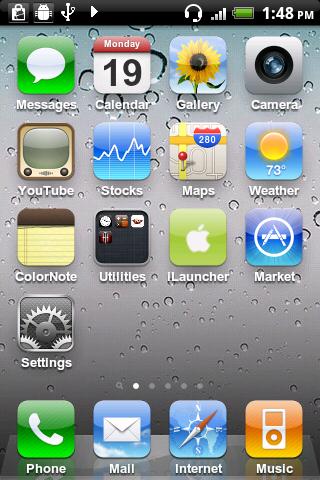
Overview: iPhone style home screen launcher
This is an iPhone style home screen launcher. The launcher makes your phone work just like a real iPhone.


iPhone style home screen launcher
This is an iPhone style home screen launcher. The launcher makes your phone work just like a real iPhone.
- Smooth scrolling.
- Icons have rounded corners and gloss effects.
- Long touch icons to move them around and position them as you like.
- Supports a customizable dock-bar.
- Easily uninstall apps from your home screen.
- Press the back hardware key to exit edit mode.
- Spotlight search

What's in this version:
2.0.10.5
Improved performance and layouts on high resolution device
Icon backup is now supported, but i made it roughly so use it with care. Avoid using it when usb connected, downloading an app, updating apps.

Download:
http://www.filesonic.com/file/U8OQ4no

Espier Launcher 0.5.0 Android Apk App


Espier Launcher 0.5.0
Requirements: Android 2.2+
Overview: Espier launcher is a mobile phone/tablet desktop software based on Android 2.2 or above version.


It brings you the new Android operating experience. For example, it's easy to operate shortcut icons, folders, and function switches. You can manage multi task and uninstall programs conveniently. Also the natural gestures operation gives you smooth and fluent user experience.

IMPORTANT: You must turn off "Screen off and lock" feature before uninstall this app!
Main Features
- Similar with desktop layout and icons of iPhone 4/iPhone 4S;
- Support dynamic icons, such as calendar, SMS, phone and other icons, dynamically display the date, the number of unread messages or missed calls;
- Create and edit folders by fast way;
- Easy Desktop Editing: press and hold any icon into desktop editing mode;
- Support for adding shortcuts on the desktop;
- Applications Access Control: user must input patterns or digital password to start applications;
- Support a variety of icon sorting method;
- Support for Desktop Searching: you can easily search for applications, contacts, SMS, e-mails and so on;
- Support for Desktop configuration restore/backup;
Main operating methods
- Open desktop editing mode: press and hold any icon until all icons begin to vibrate;
- In desktop editing mode, drag the icon that you wish to move for position adjustment;
- In desktop editing mode, tap "X" on the top left corner the icon for uninstallation;
- In desktop editing mode, drag and overlap any icon help to create a folder;
- In desktop editing mode, press and hold an icon , then filp around the phone will help to move the icon to another switched page;
- Slide finger from screen bottom to top, then go into the task bar, press and hold the icon to vibration and tap "-" on the top left corner of the icon can quickly kill the process;
- Slide the task bar to right into the system function switch area, then you can open or close multiple system functions;

What's in this version:
Support widget
New icon base map strategy
Fix some bugs

Download:
http://www.filesonic.com/file/irvQu62/mobi.espier.launcher-35-0.5.0.apk

iCS Launcher v1.4.0.0 (1.4.0.0) Android Apk App


ICS Launcher 1.4.0.0

Requirements: Android 2.0+
Overview: Get 4.0 on any Android device with Ice cream sandwich Launcher!


What is ICS Launcher?

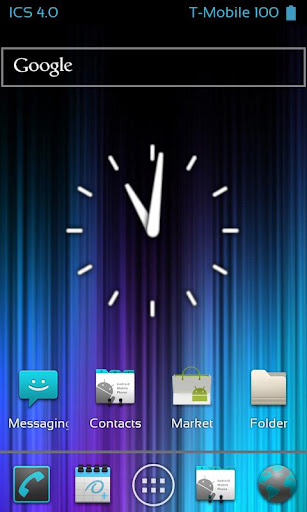
Ice Cream Sandwich launcher is a home replacement that will give any Android device the look and feel of the unreleased android update, 4.0 ice cream sandwich. This launcher will do its best to clone the UI and features of the official update. Although the real 4.0 update has yet to arrive and has been postponed, we will do our best to update the launcher as new information is released!

What are the main features of Ice Cream Sandwich Launcher?

★Clones Ice Cream Sandwich 4.0
★Extremely Fast and Smooth Scrolling (When properly set up)
★ICS Wallpaper Chooser with 9 wallpapers
★Hide Notification Bar (Gesture/Swipe up)
★ICS Settings
★ICS Styled Google Search Bar
★Icy Blue ICS Analog clock
★Hide Labels (Under Launcher Settings in ICS Settings)
★Tutorials and Help
★Supports all sources of wallpapers (e.g. Cyanogenmod, gallery, 3rd party choosers)
★Supports Live Wallpapers (All sources)
★Scrollable Widgets (e.g. HTC, Colorize Widgets, Fancy Widgets)
★Re-Sizable Widgets (Any resizable widget)
★And much more to come!


What's in this version:
NOTE - Sorry for the long delay! I have been very busy with school and tests :-(
In-Launcher Status bar
Full Customization
Garden Crosshairs
Official Clock
Official screen indicator
Revamped Search Bar
Revamped screen slide & bounce
Dock bar fix (Icon getting stuck)
Drawer Advancement
Preparation for next update
WebServer integration
Transitions throughout
New menus and navigations

Download:
http://www.filesonic.com/file/DXGZBjA

TW Launcher v4.5 2.3.5 (Hacked TouchWiz 4 launcher) Apk App


TW Launcher v4.5 2.3.5 (Hacked TouchWiz 4 launcher)
Needs: Every device with armv7 processor and froyo or higher
Summary: This is the twlauncher 4.5, actually the tw4 launcher from Samsung heavily modified by Fr4gg0r and Swiftwork.

O NOT have to be ROOTED! You will be able to install it without having rooted your phone, but you will miss some options.

Secondly, I strongly suggest you to have another launcher installed (and defrozed)... this for avoiding a loop reboot and to be able to work, remove,... with applications.

Here are two choices :
1. simple put the .apk of the launcher in any folder of the phone and double-clic on it
2. follow this upper procedure :

if you do not have the TW4.5 installed (and have a Samsung phone or have touchwizz installed) :
go in "system/app"
find "TouchWiz30Launcher.apk" and rename it to "TouchWiz30Launcher.apk.OLD"
find "TouchWiz30Launcher.odex" and rename it to "TouchWiz30Launcher.odex.OLD"
find "TWLauncher.apk" and rename it to "TWLauncher.apk.OLD"
find "TWLauncher.odex" and rename it to "TWLauncher.odex.OLD"
find any other file with "TW" and "Launcher" in the name and rename them with .OLD at the end
if you do not find this files (other phone or touchwizz not installed), don't be afraid... just skip this steps !
[*]if you already have a version of TW4.5 installed :
go in "system/app"
find "TW4Launcher.apk" and rename it "TW4Launcher.apk.OLD" or simply delete it
copy the latest version of launcher you have downloaded in this folder.
[*]if you want to make a really clean new installation of your launcher, you also can rename "data/data/samsung.tw4.nextgen" folder in (for example) "samsung.tw4.nextgen.OLD", do the same for "sdcard/.TW4Themes" folder to "sdcard/.TW4Themes_OLD" (or delete it) and relaunch the launcher.
The new folder, with default settings, will be created.

Last points... installing the Widgets.

First to know that special widgets needs to :
- have a samsung framework
- have been resigned to be functionnals with TW4.5 Launcher

You also can download some widgets (resigned) for SG1 and SG2 via TW4Manager and "Widgets" :
run TW4Manager (think just to check you have the very latest version)
go in "Widgets"
select the system you want (SG1 or SG2)
a list of available resigned widgets will be shown
check the one you want
hit the "Menu" button
choose "apply selected"

The widgets will be installed.

Note that:
- Power Widget stays gray on samsung firmwares (it does not on cm7 for example), after reboot it will be displayed normally.
- some widgets listed will not be functionnals on some systems.
- not all widgets are listed. Scroll the official thread to find more (and report links so I can put the links here)
- on my SG2 quite all other widgets are functionnals (not all of Samsung)
- some widgets, even if resigned, will absolutely not work on some phone. So sad... but take other widgets, sorry !
- if you have some widgets which are absolutely working, please send me a PM with the widget's name, your phone (and ROM) and, of course, a downloadable link so I will upgrade the infos

Launcher TW4.5 : actions on screens

This Launcher acts quite the same as the touchwizz 3.0 launcher. But I will explain you here how to do some little actions on the main screen.

set default screen
you quickly can know which is the main screen by :

- pinching in on the screen (or by hitting menu and then configure). A list of all desktops will appear :


The default mainscreen is the one with the little house drawed on it.

To change the default homescreen, from this view:
- hit the menu key
- click on "define as default homescreen"
- select the one you want. It will be greyed
- click on "ok"


adding screens
- pinching in on the screen (or by hitting menu and then configure). A list of all desktops will appear :

- press the + button to add a new screen


removing screens
- pinching in on the screen (or by hitting menu and then configure). A list of all desktops will appear :

- press and hold the screen you want to remove
- drop the holded screen in the bottom trash bin
- validate


change the size of widgets
press long the widget until the phone make a little vibration. then stop pressing. You will see a yellow grid allowing you to resize the widget by dragging the grey corner :


quickly select a screen
you have many options to quickly select a screen :
- if you're not on the main screen, simply hit the middle button to go back to main screen
- hit the "pageIndicator" of the page you want to reach
- slide the "pageIndicators" to quickly browse screens


basis functions
adding new shortcuts, change wallpaper, adding widget, moving shortcuts and widgets through screens,... are like the TW3.0
Just to note that if you have themed applications, shortcut of those which are dragged from the appdrawer will have the themed icon.


Download:
http://www.filesonic.com/file/QNStpLY

Themes collection by me:
http://www.filesonic.com/file/YDQ6xEr

Cara Mudah Membuat Launcher Android Untuk Website


Cara Mudah Membuat Launcher Android Untuk Website- Kali ini saya akan berbagi tentang cara membuat Launcher Android untuk Blog atau website dengan menggunakan AppsGeyser. Caranya sangat gampang.


1.Tulis Website URL anda
2.Berikan Nama aplikasi anda
3.Deskripsi blog anda4.Icon,pilih custom icon sesuai dengan selera anda
5.Category blog


6.Lalu klik create
7.Daftar
8.Publis.
9.Selesai
Klik disini untuk memulai membuat blog launcher android anda dan blog anda juga bisa dipasang iklan untuk mendapatkan nilai lebih hehehehe....Selamat Mencoba.

Cara Install Android 4.0.3 ICS RC3.1 on the Samsung Galaxy S GT-I9000


Berbahagialah Pemilik dari Samsung Galaxy S GT-I9000 akan memiliki lebih banyak alasan untuk merayakan sebagai versi RC semua-baru Android 4.0.3 Ice Cream Sandwich untuk Samsung Galaxy S GT-I9000 telah tiba. Juga dikenal sebagai RC3.1 ICS Android 4.0.3, upgrade menjanjikan fitur menarik baru dan perbaikan bug untuk versi RC sebelumnya.

Menampilkan layar sentuh 4.0 inci Super AMOLED bersama-sama dengan Cortex-A8 prosesor 1 GHz dan 512 MB RAM, Galaxy S membuat Ice Cream Sandwich menjalankan pengalaman berharga. Para RC3.1 firmware membangun masih pada tahap beta dan tidak sepenuhnya belum stabil, meskipun semua fitur inti dari ICS utuh dan Anda akan jarang menemukan kesalahan angkatan dekat apapun.

RC3.1 firmware Android 4.0.3 ICS untuk S Galaxy bukan merupakan rilis resmi dari atau pernyataan resmi dari Samsung. Padahal, jika Anda ingin update resmi dari Samsung, Anda mungkin ingin menunggu Pack Nilai untuk Galaxy S bahwa Samsung telah dijanjikan dan yang membawa fitur yang sama seperti yang dari firmware XXJVU.

Fitur bekerja dalam firmware RC3.1 meliputi:


  • Kamera
  • Bluetooth
  • Wireless penarikan dan penarikan kabel
  • GPS
  • Wi-Fi
  • Wajah Aktifkan
  • Panorama mode
  • Radio FM
  • Akselerasi hardware
  • Radio antarmuka Link
  • Audio
  • Touchscreen
  • Kalender dan Kontak sinkron
  • Android Market
  • Internal dan eksternal penyimpanan
Jika Anda masih ingin melanjutkan dengan menginstal RC3.1 Android 4.0.3 untuk Anda Galaxy S, kemudian diperingatkan bahwa kita tidak bertanggung jawab atas insiden tak diinginkan yang mungkin terjadi selama instalasi firmware RC3.1 Ice Cream Sandwich . Lanjutkan risiko Anda sendiri.

Persyaratan


  • Berakar Samsung Galaxy S GT-I9000, lebih baik berjalan pada Android versi 2.3.6 firmware XXJVU. (Jika Anda ingin memperbarui telepon ke firmware versi XXJVU, lihat panduan ini.
  • Download Android 4.0.3 RC3.1 paket ROM dari sini dan simpan ke komputer Anda. Jangan mengekstrak isi file.

Instruksi


  1. Hubungkan telepon Anda ke PC Anda melalui kabel USB dan copy file ROM download ke akar kartu sd Anda. Pastikan bahwa Anda tidak menempatkannya jauh di dalam subfolder pada kartu memori mungkin ada kemungkinan besar bahwa file tidak dapat terdeteksi.
  2. Aktifkan debugging USB pada perangkat Anda dengan menuju ke Pastikan bahwa ada tanda centang di samping pilihan USB Debugging "Pengaturan Debugging> Aplikasi> Pembangunan> USB.".
  3. Matikan telepon Anda dan masukkan mode recovery. Anda dapat melakukan ini dengan secara simultan menekan tombol Volume Naik tombol kunci dan OK, kemudian menekan tombol Power.
  4. Setelah masuk mode recovery, pilih "Hapus data / reset pabrik", kemudian pilih "Hapus partisi cache" untuk membersihkan cache ini ditemukan di perangkat.
  5. Pilih "Instal zip dari sd card", lalu "Pilih zip dari kartu sd". Pilih ICS RC3.1 file yang telah disalin ke telepon Anda. Proses instalasi dapat bervariasi dan dapat berlangsung 5-10 menit sebelum instalasi selesai.
  6. Setelah firmware ICS telah berhasil diperbarui, pilih "+ + + + Kembali + + + +" dan pilih "Reboot sistem sekarang" untuk reboot ponsel Anda dan menerapkan perubahan. Harap dicatat bahwa mungkin diperlukan waktu beberapa saat untuk telepon Anda untuk boot kembali normal karena ini adalah pertama kalinya itu berjalan Es Krim Sandwich.

Selamat! Anda telah berhasil menginstal RC3.1 Android 4.0.3 Ice Cream Sandwich pada Anda Samsung Galaxy S.

3 APLIKASI LAUNCHER ANDROID TERBAIK UNTUK MENGGANTI TEMA


Buat anda yang belum tahu arti launcher, akan kami jelaskan secara singkat.

Launcher adalah aplikasi bagi android yang berguna untuk mengubah tampilan android secara keseluruhan menjadi lebih baru atau fresh.

Inilah salah satu kelebihan Smartphone atau Tablet berbasis android, kita sebagai user bebas merubah tampilan dasarnya. Hal ini dikarenakan semakin banyaknya developer android, khususnya yang berfokus pada launcher ini.
Berikut kami rangkum 3 Aplikasi Launcher Android versi androidcoffee.com

Go Launcher EX

Go Launcher kami tempatkan pada urutan pertama karena, launcher ini merupakan launcher paling sempurna di antara launcher-laucnher yang pernah kami coba. berikut kami sertakan kelebihan yang tidak dimiliki launcher lainnya :

Go Launcher merupakan launcher paling hemat resource diantara launcher lainnya. kami mencoba instal launcher ini pada HandPhone LG optimus Me, dengan processor 600 Mhz dan RAM 175 Mb. hasilnya adalah tidak ada perbedaan antara memakai launcher dan tidak memakai launcher. semua aplikasi berjalan dengan smooth
Go Launcher memiliki paling banyak tema di android market. silahkan search di android market, aplikasi go launcher ini memiliki paling banyak tema di banding launcher lainnya
Terdapat fitur ” Stop Aplikasi “. ini fitur yang menurut kami paling bermanfaat dalam launcher ini. dengan fitur ini kita bisa kill aplikasi secara paksa tanpa harus instal aplikasi pihak ketiga seperti ” advance task manager”

Selain beberapa kelebihan diatas terdapat fitur-fitur yang kami rangkum dari market :

Terdapat ribuan tema untuk personalisasi yang dapat di download gratis di market
Terdapat widget-widget yang atraktif, seperti : widget kalender, jam widget dan lain-lain
Dapat mengeset icon yang akan digunakan

Penasaran ? Coba liat screenshotnya :

Go Launcher Ex
Kalo launcher yang satu ini cocok bagi agan-agan yang barusan punya android (masih newbie) dan banyak sekali widget-widget dalam launcher ini cont: go power master, go task manager, go sms pro,etc... dan tema-temanya buanyak banget gan.. jadi tunggu apalagi langsung aja coba nih launcher

Untuk Link Download nya, silahkan menuju link berikut :

disini
disini via Mediafire

Tata cara Instalasi :

Download Salah satu dari link diatas
kalau via market, klik aja link diatas, setelah masuk di market, instal seperti instal aplikasi biasa. setelah download dan instalasi selesai, tekan menu home pada android anda. setelah itu akan muncul pop up untuk memilih theme mana yang akan digunakan untuk jadi default home android anda
via mediafire. download link diatas. copy file yang anda dapat ke sdcard, kemudian pada menu explorer android anda, cari file yang sudah anda copy. kemudia klik dan instal. ikuti langkah kedua sebelumnya

ADW Launcher

Diposisi Runner Up, ADW Launcher cukup menyita perhatian kami. beberapa kelebihan dari launcher :

Memiliki banyak tema yang siap dipakai. meskipun tidak sebanyak go launcher, aplikasi launcher ini cukup banyak memiliki tema yang siap di aplikasikan di gadget android anda
tidak membutuhkan resource banyak. ketika kami mencoba menggunakan launcher ini, didapat tidak banyak perubahan dibanding saat tidak menggunakan launcher. artinya kecepatan dan response saat menggunakan launcher ini hampir sama dibanding saat tidak menggunakannya. perlu diketahui kami mencoba launcher ini dengan handphone LG Optimus ME

Tidak lengkap rasanya kalau tidak menyertakan link download aplikasi ini, berikut kami sertakan link downloadnya :
Disini
Disini via Mediafire


Tata cara Instalasi :

Download Salah satu dari link diatas
kalau via market, klik aja link diatas, setelah masuk di market, instal seperti instal aplikasi biasa. setelah download dan instalasi selesai, tekan menu home pada android anda. setelah itu akan muncul pop up untuk memilih theme mana yang akan digunakan untuk jadi default home android anda
via mediafire. download link diatas. copy file yang anda dapat ke sdcard, kemudian pada menu explorer android anda, cari file yang sudah anda copy. kemudia klik dan instal. ikuti langkah kedua sebelumnya.

GingerBread Launcher, Aplikasi Launcher Android, Tema Launcher Seperti
GingerBread

Buat anda yang sudah memiliki Handphone android versi froyo (2.2) dan GingerBread (2.3). launcher ini layak buat anda coba.

Berikut Fitur-fiturnya :

Animasi 3 dimensi pada menunya
tampilan berubah seperti menggunakan android gingerbread

Screenshot :

Link Download :

disini
disini via Mediafire

Tata cara Instalasi :

Download Salah satu dari link diatas
kalau via market, klik aja link diatas, setelah masuk di market, instal seperti instal aplikasi biasa. setelah download dan instalasi selesai, tekan menu home pada android anda. setelah itu akan muncul pop up untuk memilih theme mana yang akan digunakan untuk jadi default home android anda
via mediafire. download link diatas. copy file yang anda dapat ke sdcard, kemudian pada menu explorer android anda, cari file yang sudah anda copy. kemudia klik dan instal. ikuti langkah kedua sebelumnya

Collection of Launcher For Android


1) Untuk deskripsi lebih lanjut klik Link Market
2) Update terbaru akan ditaruh di atas biar gampang menemukannya

Update 26 Jan 2012
-Honeycomb Launcher


Serasa pake Honeycomb.. enak juga dipake..

-Simple Launcher 1.00 BETA 2


Launcher minimalis..

-Circle Launcher 1.7.2
Launcher icon menunya jadi lingkaran


Update 23 Jan 2012
-IIDA Launcher
Launcher ini salah satu launcher yg ane suka. Docking barnya bagus
tambah efek-efek yang keren.
atau                 : http://www.mediafire.com/?htl7sjo5r78xikz
cara instal : ekstrak file menggunakan androzip atau alat lain, sesudah di ekstrak
matikan HH dan masuk ke recovery menu (tekan tombol Home,dan tombol lock screen)
atau lewat CWM. kalau sudah masuk pilih baris yg ke dua trus pilih IIDA launcher.apk

- SAYA TIDAK BERTANGGUNG JAWAB BILA TERJADI KESALAHAN ENTAH HH ANDA BOOTLOP ATAU YG LAINNYA -

Update 17 Jan 2012
- ssLauncher v1.1.1  (upgrade dari v.1.1.0, ada di bawah)
Requirements: Android version 2.1 and higher
Ciri kha launcher ini adalah: homescreen ala majalah
Di versi ini ada efek pergantian halaman(flippping)

Link market: https://market.android.com/details?id=com.ss.launcher Download Instructions:
Link d/l (pilih)


Update 16 Jan 2011
Android Seven Launcher-Full v1.8
Requirements: 2.2+
Satu lagi launcher rasa komputer windows 7

Enjoy the real look and feel of W*ndows 7 on your Android phone. The real interface HOME SCREEN with all features that are must for a Launcher.
It has more features than others available launchers in the market like SPB Shell or ADW Launcher.

FEATURES for Android 7 as follows
-Zip Unzip files folder
-Explorer
-Tools
-View different format of files
-Drag and drop feature
-Cut, Copy and Paste feature
-Install new application on phone with this Launcher
-OPEN EPUB directly from your SD Card
-Widgets

NO NEED TO DOWNLOAD OTHER FILE EXPLORERS, ZIP APPS OR, Theme or wallpaper applications. It has ALL IN ONE ANDROID 7 APP.

The highlited feature of this app is:
You can use this application with any sized LCD, any resolution, any android mobile and tablets!


-ssLauncher v1.1.0
Requirements: Android 2.2+
Fitur: Launcher yang bikin layar hh mu mirip sampul majalah

-Launcher 7 – Donate v1.0.1.25
Requirements: Android 2.1+
Satu lagi launcher rasa WP7


- Full Screen Launcher Pro v1.6.5
Requirements: for Android version 2.2 and higher
Fitur: Launcher 3D (bukan dalam arti stereoscopic tapi dengan tampilan perspektif) yg memanfaatkan seluruh layar.
Link d/l: (pilih)
Download instructions:


- GO Launcher EX v2.76 beta3
Requirements: Android 2.1+
Mungkin inilah launcher yang paling sering diupdate.Mendukung ratusan theme, dan beragam fitur-fitur berguna. Terintegrasi dengan produk2 Go Dev lainnya spt Go Lock, Go SMS dll.
Features:
- Hundreds of themes
- Fancy home screen transition
- Smooth scrolling experience
- Icon popup menu
- Folder and task manager in app drawer
- Gesture supported
- Scrollable & resizable widgets supported


-Claystone Launcher v1.18
Requirements: Android 2.1 and higher
Fitur: launcher dengan konsep stack/tumpukan yang memberi kesan 3D ketika menggeser drawer
Link d/l:
atau


-360 Launcher v1.3 (+ themes, lockscreens)
Requirements: Android 1.6+
Kombinasi antara QQ Launcher dan MX Home


-aShell Home Screen Launcher v1.1.6b
Requirements: Android 2.1+
Fitur: launcher dengan docking bar yg memperlihatkan calls log, pesan sms dan task manager


- ICS Launcher v1.4.0.0
Requirements: Android 2.0+
Fitur: launcher rasa ICS
Link d/l:(pilih)


-Regina 3D Launcher Pro v1.2.0
Requirements: for Android version 2.1 and higher
Fitur: launcher dengan penggunaan grafis 3D murni yg menampilkan berbagai efek 3D dinamis
Link d/ld (pilih)


-Zeam Launcher v3.1.9
Requirements: Android OS 2.2+
Launcher minimalis


SPB Shell 3D v1.52 Full
Requirements: Android 2.1-2.3.7
Launcher populer yg diidam-idamkan banyak org dengan efek layar dan widget 3D
NOTE: butuh ROOT (utk cracknya)

Cara Install:
Uninstall any previous versions and reboot.
Install SPB Shell 3D 1.5.2 and do not run.
Use your default launcher and install and run spbshellpatcher.apk
Click Activate, wait for the patch to complete and you can then use SPB Shell 3D 1.5.2
Link d/l (pilih)


- Nemus Launcher v1.5.2.2
Requirements: Android 2.1+
Launcher dengan manajemen penempatan shortcut dan folder yg unik


-Balancer Launcher v1.0.6
Requirements: for Android version 2.1 and higher
Fitur: launcher dengan fokus ke efisiensi pemakaian dengan menghilangkan setting2 yg kurang berguna


- SenseLike Home Screen v0.30
Requirements: Android 2.3.3+
Launcher rasa Sense UI nya HTC


- MIUI.ADW iPhone Launcher v1.2.16
Requirements: for Android version 2.1 and higher
Launcher rasa kombinasi Iphone dan launchernya MIUI ROM
Bisa dipakai sebagai themenya ADW Launcher atau sebagai launcher tersendiri


- Espier Launcher v0.5.1
Requirements: Android 2.1+
Launcher mirip iPhone


- ADW.Launcher v1.3.6
Requirements: android 2.0+
ADW.Launcher, beyond tweaking your android desktopOpensource home replacement app
-Customizable application drawer (old one or iphone/galaxy one)
-Customizable drag&drop action buttons
-Unveil the Dockbar flicking-up the app-drawer button and drop UNLIMITED shortcuts/folders!
-Themes
Tips:
-Read the changelogs and the application blog.
-To change your screen configuration, press Menu/Edit while at the desktop
-To create your own app drawer launcher button just press Menu/Add/Launcher Actions/Open app drawer

================
MICRO SD CLASS 4 & 10 GARANSI LIFETIME, FREE BONUS ISI APLIKASI & GAMES SELAMANYA , untuk detail klik di http://on.fb.me/HRmXhZ
================
Cape Download ?? Download aplikasi & games ga kelar2 ?? udah download malah game / aplikasinya ga kompatibel?? Tenang aja gan, ane Jual DVD aplikasi & Games Android SUper Lengkap , last update APRIL 2012 . list game lengkap cek di http://on.fb.me/ywWqvT , GARANSI UANG KEMBALI APABILA GAME & APLIKASI GA KOMPATIBEL atau GA JALAN
=======================
lowongan kerja 2012 : http://lowongankerja212.com/
aplikasi android Gratis : http://aplikasiandroid.net/
=================
-HeLauncher2 v1.0.7
Requirements: Android 2.1+
Fitur: konon hasil perkawinan banyak launcher dengan fokus kesederhanaan
- Eleven custom themes (Gingerbread, Sense 3.0, Touchwiz 4.0, and more!)
- Transition animations for the desktop
- Blocked applications manager
- Various settings picked for Android users by Android users
- Resizable and Scrollable widget compatible
Link d/l: (pilih)


- QQLauncher Pro-More Customize v1.32
Requirements: Android 2.0+
The launcher supports the following cool features:
1. Built-in widgets such as shortcut switches and task manager;
2. Impressive screen-switching effects (menu > settings > screen);
3. A complete set of program management functions, free sequencing, multidimensional arrangements, and smart searches;
4. Quick access to the Store for users to download applications anytime;
5. Custom folders that classify applications;
6. One-key desktop relocation without losing anything. (Tapping OK after the first installation will guide you through importing default desktop icons.)
7. Provide several sets of personalized skin.
Link d/l (pilih)


- Xperia Active Launcher
Requirements: Android 2.3+
atau               : http://www.mediafire.com/?1eeaz1jsi3fjs7x